
Our Articles


Blog

Published on October 16, 2025
You wake up thirsty, head to the kitchen, and press your glass against the ice dispenser. Nothing comes out. You open the freezer and check the ice bin. It's completely empty — or packed with ice frozen into one solid lump that won't break apart.
If your Samsung refrigerator is not making ice, you're not dealing with something rare. This is one of the most common appliance calls we get at Fair Appliance Repair Service in Sacramento. The good news is that most Samsung ice maker problems have a fix you can try right now, before calling anyone.
This guide covers every reason why your Samsung fridge stopped making ice, what to check first, how to reset it, model-specific fixes for French Door, Family Hub, Ice Max, and bottom freezer models, and when the problem actually needs a professional.
Before you do anything else, check this. It sounds too simple, but it fixes the problem more often than you'd expect. Someone accidentally bumps the control panel while loading groceries, or a power flicker resets the settings — and suddenly the ice maker is off.
● If your Samsung fridge has a control panel on the door: Look for an "Ice Off" button or icon. If it's lit, the ice maker is off. Press and hold it for about 3 seconds to turn it back on.
● If your Samsung fridge has a control arm inside the freezer: Open the freezer and look at the ice maker unit. There's a metal or plastic arm attached to it. If that arm is raised up, the ice maker is off. Push it gently downward until it clicks into place.
● If your fridge has an "Ice On" button: Make sure the Ice On light is illuminated, not the Ice Off light.
Once you turn it back on, wait a full 24 hours before expecting ice. The first batch takes time — don't call it broken after an hour.
Most Samsung ice maker problems come down to one of these six things:
1. Ice buildup is blocking the chute or freezing the mechanism
2. The freezer temperature is too warm
3. The water filter is clogged and needs replacing
4. The water supply line has low pressure, a kink, or mineral buildup
5. The water inlet valve is faulty or worn out
6. The ice maker needs a reset to clear an electronic glitch
These problems show warning signs before they get serious. Smaller ice cubes, slower production, or ice clumping together in the bin are all early signals. In Sacramento, hard water — which runs between 150 and 300 ppm in minerals — speeds up filter clogs and waterline buildup faster than in most other areas. Catching these signs early saves you from a complete ice maker failure later.
Let's go through each cause so you can figure out exactly what's happening with your fridge.
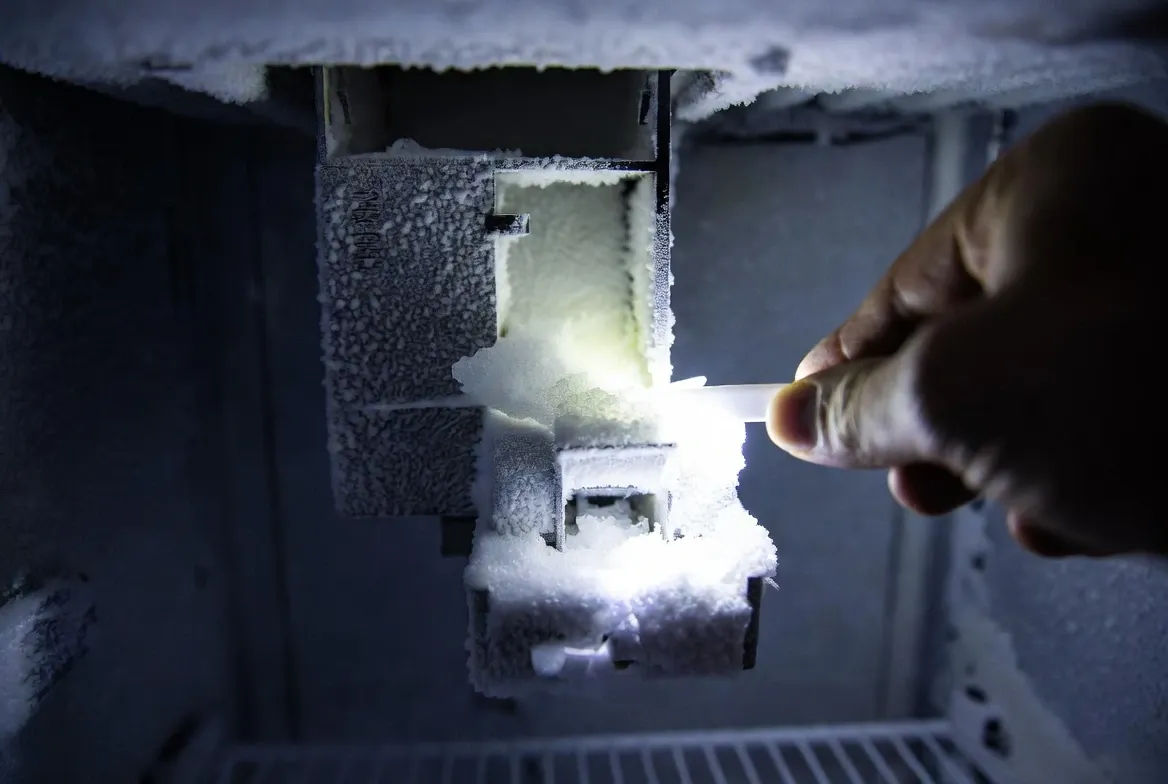
This is the number one Samsung ice maker problem we see. A small amount of water lands where it shouldn't — maybe from condensation or a few drops that didn't freeze properly — and turns into a solid ice bridge that blocks the chute. Ice can't drop into the bin, so production stops.
How to spot ice buildup:
Pull out the ice bin completely and look up into the chute with a flashlight. Check for a solid chunk of ice blocking the opening. See if the arm or paddle is frozen in place and won't move.
How to fix it:
Remove the ice bin and dump out any ice stuck together in clumps. Look up into the freezer where the ice maker sits. If you see ice blocking the chute, use a plastic utensil to carefully chip it away. Don't use metal tools — they can crack plastic parts and make things worse.
If the whole ice maker assembly is covered in frost, you need to defrost it. Here are three ways:
Leave the freezer door open for 2 to 3 hours with towels on the floor to catch dripping water. This is the easiest method and won't damage anything.
Use a hair dryer on the lowest heat setting, holding it at least 6 inches away from plastic parts. Keep it moving constantly and never leave it sitting in one spot.
Turn off the entire refrigerator overnight and let everything thaw completely. This is the safest method but you'll need to move frozen food to another location first.
After defrosting, wipe everything dry with a clean cloth. Turn the ice maker back on and check again in 24 hours.
Warm, humid air is getting into your freezer. This happens when door seals are worn or dirty, when something is blocking the door from closing fully, or when the automatic defrost system isn't working right. Clean the door seals with warm soapy water and make sure nothing is blocking the door from closing completely. Sacramento's hot summers carry a lot of humidity — every time you open the freezer, some of that warm air sneaks in and contributes to the problem.
Your Samsung ice maker needs the freezer at 0°F or colder to work properly. If it's too warm, ice forms slowly, comes out small and hollow, or doesn't form at all. If it's too cold, some components freeze up and stop working.
How to check:
Look at the display panel on your refrigerator door. Most Samsung models show the actual temperature, not just the setting. You want to see 0°F for the freezer. If it's showing 5°F or higher, there's a real problem.
How to fix it:
Press the Freezer button on the control panel and keep pressing until it shows 0°F or -2°F. Some Samsung models perform better at -2°F for consistent ice production.
Wait a full day, then check the temperature again. If it still isn't reaching 0°F, the problem could be worn door seals, blocked air vents inside the freezer, a faulty temperature sensor, or a compressor issue — all of which need a technician.
Sacramento summers make this worse. When it's 100°F or hotter outside, your refrigerator works much harder to stay cold. If your fridge is older and the seals have worn down, summer is exactly when these temperature problems show up.
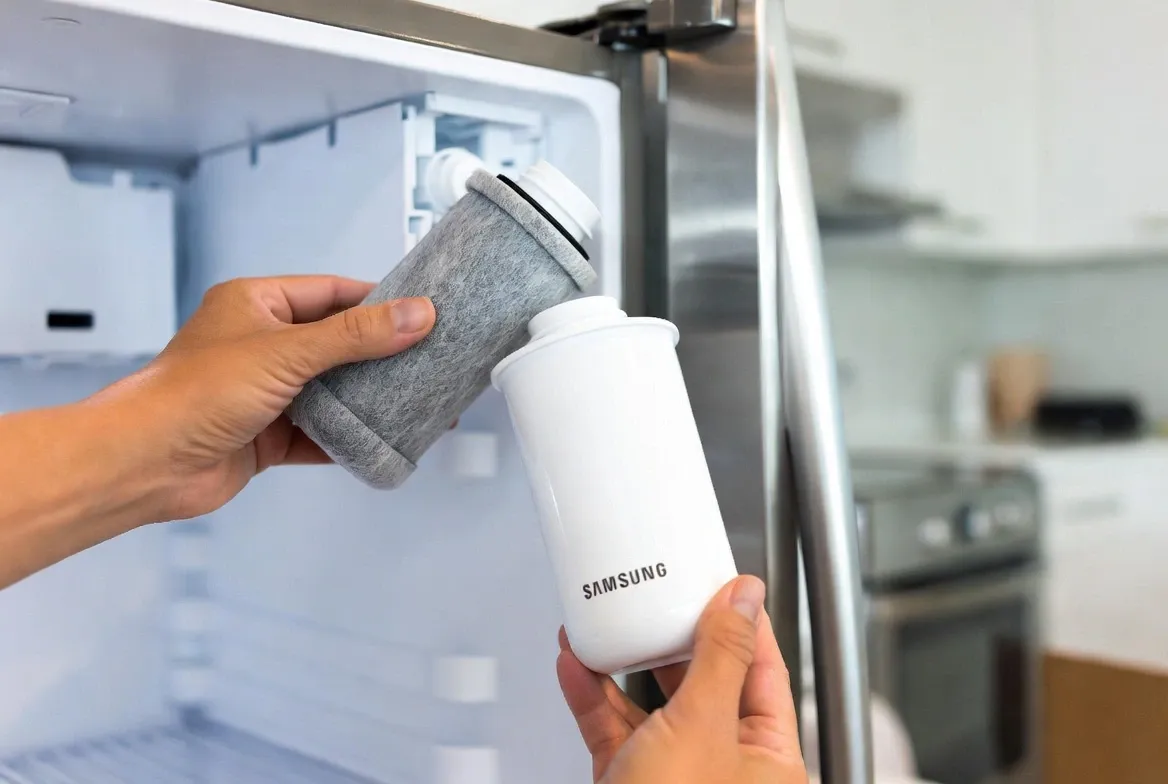
A clogged water filter is one of the most overlooked reasons why a Samsung fridge stops making ice. The filter removes chlorine and minerals from your water, but over time it fills up and restricts flow. When the ice maker doesn't get enough water, production slows down or stops completely.
Samsung recommends replacing the filter every 6 months. In Sacramento, every 4 months is smarter. The city's hard water clogs filters faster than average.
How to tell if the filter is the problem:
Check the display panel. If you see a red or blinking "Filter" light, it needs replacing. You can also run the water dispenser — if the flow seems slow or weak, the filter is likely clogged.
How to replace it:
You don't need any tools. On most Samsung models, the filter sits in the upper-right corner of the refrigerator compartment. On some models it's in the bottom grille.
Turn the filter counterclockwise, pull it straight out, remove the protective caps from the new filter, push it in, and turn clockwise until it clicks.
Use genuine Samsung filters. Generic filters don't always fit right and some don't filter properly, which can actually cause more problems down the road.
After installing the new filter, run 2 to 3 gallons of water through the dispenser. This clears air from the lines. Ice production should improve within 24 hours.
Water Supply and Inlet Valve Problems
If no water reaches the ice maker, you won't get any ice. Your Samsung ice maker needs at least 20 psi of water pressure to fill the tray properly.
Signs of a water supply problem:
The water dispenser works slowly or not at all. Ice cubes are smaller than normal or hollow in the middle. Ice production has dropped significantly or stopped. No ice forms at all even after a reset.
What to check first:
Go to the back of your refrigerator and find the water supply line. It's usually a thin plastic or copper tube connected to the wall. Make sure the valve is turned all the way open — it should run parallel to the pipe. If it's perpendicular, it's closed or only partly open.
Follow the water line from the wall to the fridge. Look for kinks, sharp bends, cracks, or wet spots around the fittings. Sacramento's hard water causes mineral buildup inside the line over time, which restricts flow even when everything looks fine from the outside.
When the inlet valve is the real problem:
The water inlet valve sits at the back of the refrigerator and controls the flow of water into the ice maker. If your water dispenser works fine but the ice maker still gets no water, the valve is a likely cause. A faulty valve can stick closed or fail to open fully.
This repair needs a technician. Replacing the inlet valve typically costs $150 to $200 including parts and labor.
This is a different problem from the ice maker not producing ice. If ice is forming in the bin but won't come out when you press the dispenser, here's what to check.
● Check for a chute blockage. Pull out the ice bin and look up into the dispenser chute with a flashlight. Ice chunks build up and block the opening over time. Use a plastic utensil to clear any blockage.
● Check the Child Lock setting. On many Samsung models, when Child Lock is on, the ice and water dispenser is completely disabled. Look for a lock icon on the display. If it's lit, hold the Child Lock button for 3 seconds to turn it off.
● Check door alignment on French Door models. If the left door has dropped slightly, the dispenser lever doesn't press correctly when you push your glass against it. Check if both doors sit level when closed.
● Listen for the auger motor. When you press the dispenser, you should hear a motor running behind the ice bin. If you hear nothing at all, the auger motor may have failed. That needs a repair technician.
This specific situation — water dispenser working fine but zero ice — is actually a useful clue. It tells you the water supply is reaching the refrigerator. The problem is isolated to the ice maker side.
The most common cause is a frozen water line that feeds specifically to the ice maker. The main line to the dispenser runs fine, but a smaller line feeding the ice tray has frozen solid.
Unplug the refrigerator and let everything warm up for a few hours. This usually thaws the frozen section. When you plug it back in, give the ice maker 24 hours to start producing again.
If the line isn't frozen and the ice maker still gets no water, the ice maker solenoid on the inlet valve — the one that controls just the ice maker side — may have failed. This is a $150 to $200 repair that a technician needs to handle.
Sometimes the ice maker's electronics get confused and need a fresh start. A reset clears the memory and restarts the production cycle from scratch. This is always worth trying before calling for service.
Pull out the ice bin. Look at the ice maker assembly. You're looking for a small button — usually blue or black — labeled "Test" or "Reset." Common locations are on the side of the ice maker housing, the bottom of the assembly, or the front edge near where the bucket sits.
Press and hold the button. After 3 to 10 seconds you should hear a chime or beep. Keep holding until you hear it. The ice maker will start a test cycle. You'll hear it running, water will fill the ice tray, and the mechanism will move through a full cycle. This takes 5 to 10 minutes. At the end, you'll hear another chime.
After the reset, wait a full 24 hours before deciding if it worked. The first complete batch takes time.
Samsung makes several refrigerator lines and the ice maker works a little differently in each one. Here's what to know for your specific model.
If your Samsung smart fridge is not making ice, the first thing to check — before anything mechanical — is the SmartThings firmware. Samsung has released software updates specifically to fix ice maker freezing and cycling issues on Family Hub and other connected models.
Open the SmartThings app, find your refrigerator, and check for available updates. Install any updates and give the fridge 24 hours. Many customers have resolved persistent ice maker problems this way without any parts replacement at all.
You can also run a diagnostic from the Family Hub touchscreen. Go to Settings, then Fridge Manager, and run the ice maker diagnostic. This identifies specific component failures if they exist.
The Ice Max system uses a dual ice maker — one in the freezer compartment and one in the refrigerator door. Each has its own separate test button and its own reset process.
If only one side has stopped producing ice, reset that specific unit by pressing and holding its test button until you hear the chime. If neither side is working, check the temperature and water supply first before resetting both units.
French Door models have one common issue that's easy to miss: door alignment. If the left door drops slightly over time, the seal doesn't press correctly and warm air gets in. This causes ice buildup inside the ice maker compartment, which then blocks production.
Check if both doors sit at the same height when closed. If the left door is lower, there's an adjustment nut under the lower-left corner of that door. Tighten it until both doors sit level.
Also check the small button on the inside top edge of the left door. This button depresses when the door closes fully. If it doesn't press in all the way, the dispenser system thinks the door is open and locks out ice dispensing entirely.
On bottom freezer models, the ice maker sits inside the freezer drawer. If the drawer isn't closing completely — even slightly — the seal breaks and frost builds up around the ice maker unit. Check that nothing is blocking the drawer from closing all the way, including food packages that have shifted.
The reset button on bottom freezer models is typically on the front of the ice maker unit. Remove the ice bin first to access it.
You've tried everything — changed the filter, verified the temperature, cleared the ice buildup, reset the ice maker. Still no ice.
Here's when you need a technician:
● You hear buzzing or clicking but no water flows. The inlet valve is likely to fail and needs replacing. Cost is typically $150 to $200 including parts and labor.
● Parts are cracked, the motor won't run, or the mechanism is still jammed after defrosting. The ice maker assembly needs replacing. This usually runs $250 to $350 installed.
● The freezer display shows 0°F but food isn't staying properly frozen. The temperature sensor is giving a false reading. The actual inside temperature is warmer than what the display shows. This is a $200 to $300 repair that requires proper diagnosis.
Use the 50 percent rule. If the repair cost is more than half what a new refrigerator costs, replacement makes more financial sense. A new Samsung refrigerator with an ice maker runs $1,200 to $2,000. If your fridge is under 8 years old and the repair quote is under $600, repairing is almost always the better choice.
Once your ice maker is working again, a little regular maintenance keeps it that way.
● Every month: Check the ice bin for clumps and break them up before they freeze solid. Make sure the freezer temperature is sitting at 0°F. Look for any frost buildup around the ice maker that wasn't there before.
● Every 4 to 6 months: Replace the water filter. In Sacramento, do this every 4 months because of hard water. Clean the door seals with warm soapy water. Vacuum the condenser coils on the back or bottom of the fridge — dust buildup makes the compressor work harder and raises the freezer temperature over time.
● Daily habits that help: Don't overfill the ice bin. Let the freezer door close completely every single time. Use ice regularly so it doesn't sit long enough to clump or freeze into a solid block.

Fair Appliance Repair Service has fixed hundreds of Samsung ice makers across Sacramento, Roseville, and Elk Grove. We know these machines well — and we understand how Sacramento's hard water and summer heat create problems that other areas don't deal with as often.
What we offer:
Same-day service is available because you shouldn't have to wait a week for ice. We give you upfront pricing before we start any work — you know the cost before we touch anything. We use genuine Samsung parts because cheap replacements fail faster. Our labor warranty is 90 days and parts warranties run 90 to 365 days depending on the part. All our technicians are licensed and insured.
Most Samsung ice maker repairs take less than an hour. We stock common parts on the truck, so there's usually no waiting around for special orders.
📞 Call now: +1 916-333-8388 🌐 Book online 24/7.
Don't keep buying bags of ice from the store. Let's get your Samsung ice maker working the way it should.
‣ The most common reasons are ice buildup blocking the chute or mechanism, a clogged water filter reducing water flow, the ice maker being accidentally switched off, or the freezer running above 0°F. Start by checking whether the ice maker is turned on, then inspect the chute for ice blockage. If the freezer temperature is above 5°F, that alone can stop ice production completely.
‣ On Family Hub and other connected Samsung models, a firmware issue can cause the ice maker to stop cycling. Connect your fridge to SmartThings and install any available updates. Also verify the ice maker is switched on in the app or on the fridge display, since smart fridge settings can reset after a power outage. If updates don't fix it, run the built-in diagnostic from the Family Hub screen.
‣ Pull out the ice bin and locate the small test button on the ice maker assembly — usually on the side or bottom of the unit. Press and hold it for 3 to 10 seconds until you hear a beep or chime. The unit will run a full test cycle lasting about 5 to 10 minutes. Wait 24 hours after the reset before judging whether it worked. If you still have no ice after 24 hours, there's an underlying problem the reset couldn't fix.
‣ When the water dispenser works fine but the ice maker gets no water, the most likely cause is a frozen water line that feeds specifically to the ice maker. Unplug the fridge for a few hours to let it thaw completely, then restart. If the problem comes back, the ice maker solenoid on the water inlet valve may have failed and will need to be replaced by a technician.
‣ The most frequent issues are ice buildup freezing the mechanism, a clogged water filter slowing water flow, the ice maker being accidentally turned off, low water pressure at the supply valve, and a faulty water inlet valve. In Sacramento specifically, hard water mineral deposits speed up filter clogs and build up inside waterlines — which is why Sacramento homeowners tend to see these problems more often and sooner than the average timeline suggests.
‣ After a reset, the ice maker runs one test cycle right away. The first full batch of ice takes about 24 hours. If there's still no ice after 24 hours, the reset didn't resolve the root problem and further troubleshooting is needed.
‣ Start with door alignment. If the left door has dropped even slightly, warm air gets in and causes ice buildup inside the ice maker compartment. Check that both doors sit level when closed. Then check the small button on the inside top of the left door — it should press fully when the door closes. After that, look for ice blockage in the chute and confirm the freezer temperature is at 0°F.
‣ A sudden stop usually means one of three things: ice buildup has blocked the mechanism, the water filter reached the end of its life and flow dropped too low to make ice, or a power fluctuation confused the electronics and the ice maker needs a reset. Work through those three checks in order before calling for service.
‣ If the repair cost exceeds 50 percent of what a replacement refrigerator would cost, replacing usually makes more financial sense. For a fridge under 8 years old with a repair quote under $600, repairing is almost always worth it. If you're seeing repeated ice maker failures on the same unit within a short time, that's a sign of a deeper mechanical issue worth discussing with a technician before spending more money on parts.


